Indie rock artist Mark Malagise uses Mental Note for iPad. His band, THRIFT, just released a self-titled EP.
—
September 2014 Update: The band just released a music video for their song “Mockingbird”, which began as a small idea in Mental Note. Check out the video!
—
Throughout the making of their EP, the band had to communicate with each other across country, sometimes internationally. Mental Note became the medium for collaborative idea transfer throughout creation of the album: from writing the songs, to recording in the studio, and all the brainstorms in between.
All of the band’s creative content is stored, grown, and developed in Mental Note. The Mental Note digital notepad was used in the idea creation process to help the band with their songwriting. Once the initial music and lyrics were in place, each song was initially recorded within Mental Note.
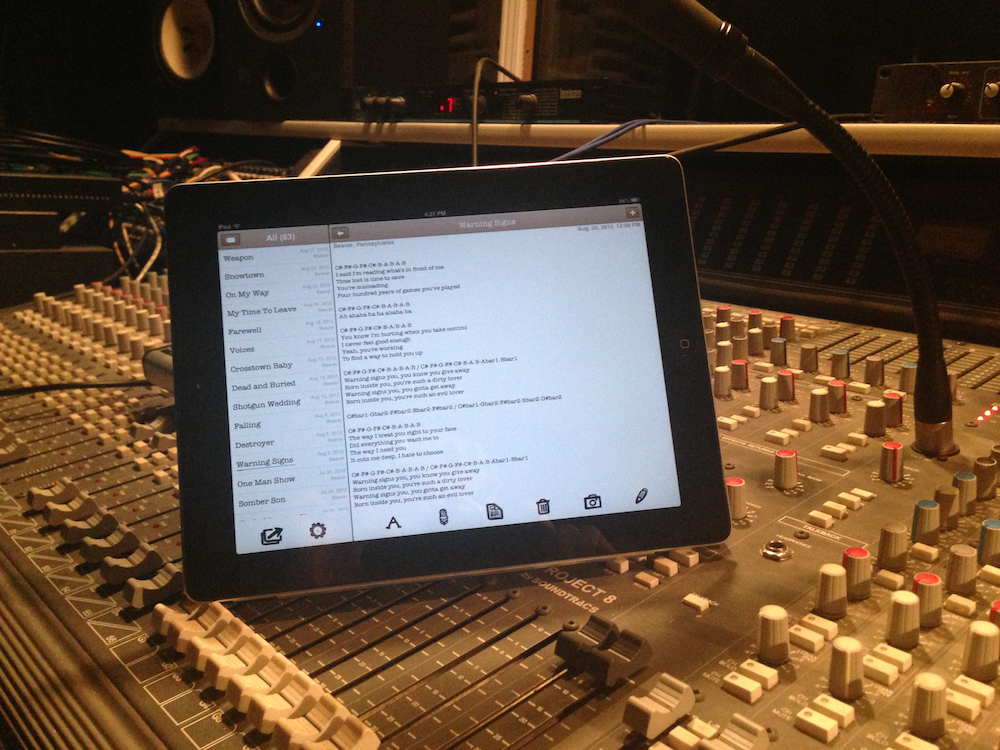
Audio snippets, written lyrics, full tracks, review notes: all this data was captured and organized within Mental Note, and then used extensively throughout the recording process.
Here’s Mark to explain:
“We actually got a lot of use from Mental Note while making the EP. With me being in Pittsburgh, Anna [Carmela] being in Los Angeles, and our producer, Brent [Setterington], being in Toronto, we used the iCloud backup feature to sync Mental Note across all of our devices so that we could share our ideas and make edits of the songs before we even got into the studio…
 …Reviewing dozens of songs was made easy, as all of the lyrics and music were in one simple notebook style app. I can’t imagine trying to open and review all of those songs through a DAW [Digital Audio Workstation] like Logic or Nuendo, let alone trying to edit them and organize all of the lyrics and notes.

Once we got to BBR Studio in Toronto, we actually used Mental Note to record auditions of us playing the prospective songs, and then made notes there on the spot of what we wanted to add, change, etc. We had access to thousands of dollars worth of recording gear, but chose the iPad and Mental Note for this task instead, as the ability to record audio directly into a note made editing, writing, and sharing our ideas as easy and seamless as possible. Also, while singing in the live room, Anna used Mental Note as an interactive lyrics sheet, as not only did the app allow her to read and create vocal/lyrical edits, but it also gave her the ability to listen to these edits as well.
Sooooo yeah… Mental Note played a big role in creating the new EP…. thank you for making such an intuitive and useful app! It is easy to use, very functional, and not bloated with a bunch of unnecessary features. Keep up the good work! You guys rock!”
Have a listen to the final product, and pick up the EP over at www.thriftnoise.com.